
Multi-Language Translation
Frequently Asked Questions
Tooling U-SME Customer Help
Tooling U-SME Multi-Language Translation provides learners with on-demand translation for eLearning courses and most of the Student Center experience.
Where is Multi-Language Translation available?
Multi-Language Translation is available for:
- Learners using the Tooling U-SME Student Center
- Tooling U-SME courses delivered through a third-party LMS using SCORM or AICC
When using the Student Center, most navigation, menus, pages, and supported course content can be displayed in the learner's selected language.
When courses are delivered through a third-party LMS, learners can select their preferred language to translate supported lesson text while maintaining the original course structure and functionality.
What languages are supported?
- English
- Spanish
- French
- German
- Italian
- Portuguese
- Chinese (Simplified)
- Japanese
- Korean
- Polish
- Dutch
- Russian
- Ukrainian
- Hindi
- Hebrew
- Thai
- Turkish
- Swedish
- Vietnamese
How do I change my language in Student Center?
After signing in to Student Center, use the language selector located in the lower-right corner of the page.
- Select the language control in the lower-right corner of the Student Center, or in the class player if you are using your company LMS.
- Choose your preferred language from the available list.
- Student Center will reload supported navigation, menus, pages, and course text in the selected language.
The language selector remains available while you navigate the Student Center, so you can select a different supported language if needed.
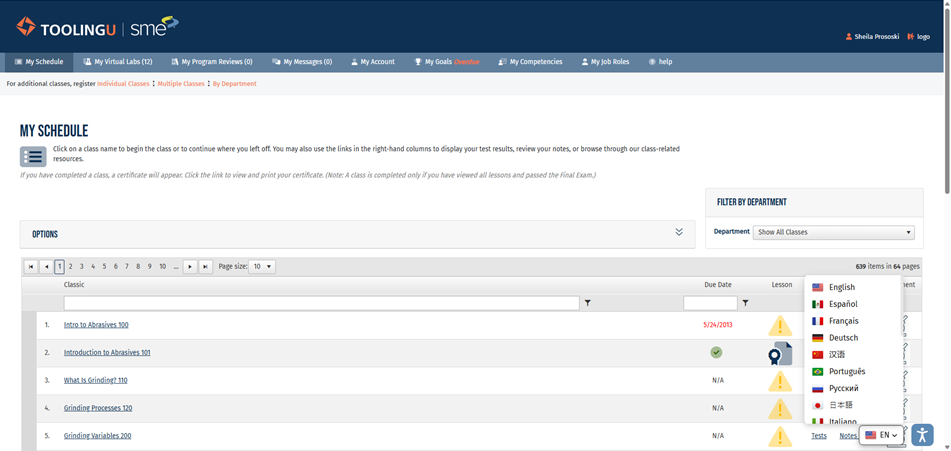
Student Center language selector (lower-right corner)
What content is translated?
Supported on-screen lesson text can be translated into the learner's selected language.
For learners using the Tooling U-SME Student Center, most system navigation, menus, and pages after login are also translated.
What content is not translated?
- Images containing embedded text
- Audio or narration
- PDF documents and attachments, including U/LINC materials
- Virtual Labs
- Video captions or subtitles
Can I change languages during a course?
Yes. However, changing languages may require the content to reload.
When changing languages during a lesson, you may be returned to the beginning of the lesson or to your last bookmarked location.
Can I change languages during a test?
Changing languages during a test is not recommended. Changing the selected language may cause the test to restart.
For the best experience, select your preferred language before beginning a test.
Why do I still see English text in some course images?
Some course images contain text that is part of the image itself. This text cannot be translated automatically by the Multi-Language Translation feature.
Image-dependent final exam questions in our most recent classes have been updated where the English text could prevent a learner from successfully completing the exam. Other course images may continue to contain English text.
If an image containing English text significantly affects your ability to understand the course, please contact Tooling U-SME Support.
What should I do if a translation doesn't seem correct?
Translations can vary based on dialect, regional usage, context, and technical terminology. Manufacturing terminology can be particularly complex, and learner feedback helps us continue to improve translation quality.
When reporting a translation concern, please provide:
- Class name
- Full page screenshot of the lesson or test question that includes the URL bar
- Language selected
- Specific word, sentence, or paragraph in question
- Suggested translation, if known
- Any additional context that may help us understand the issue
What should I do if translation is not working?
Multi-Language Translation uses browser-based functionality. If translation is not functioning as expected, try clearing your browser cache and reopening the course.
For shared computers and training rooms, we recommend configuring the browser to clear cookies and cache when it closes. This helps prevent one learner's language settings from carrying over to the next learner.
Are there network requirements for Multi-Language Translation?
If your organization uses firewall, proxy, or web-filtering policies, we recommend allowing the following domains:
- *.elfsight.com
- *.elfsightcompute.com
Blocking these domains may prevent translation components from functioning correctly.
Why does my previous language selection sometimes appear again?
Because translation is browser-based, language preferences may remain in your browser's cookies or cache.
If you are using a shared computer and see another learner's language selection, clear the browser cookies and cache and reopen the course.
What information should I provide when contacting Support?
To help us investigate translation issues as quickly as possible, please include:
- Class name
- Screenshot showing the issue that includes the URL bar on the browser
- Browser being used
- Selected language
- Specific lesson or test question, when applicable
- Detailed description of what occurred
- Suggested translation, if reporting a translation-quality concern
How is Tooling U-SME improving translations?
Customer and learner feedback is an important part of improving the Multi-Language Translation experience.
Usage data and real-world examples help us identify areas where translations can be refined, particularly for technical manufacturing terminology. Our goal is to provide translations that support learner comprehension while continuing to improve the overall experience.